


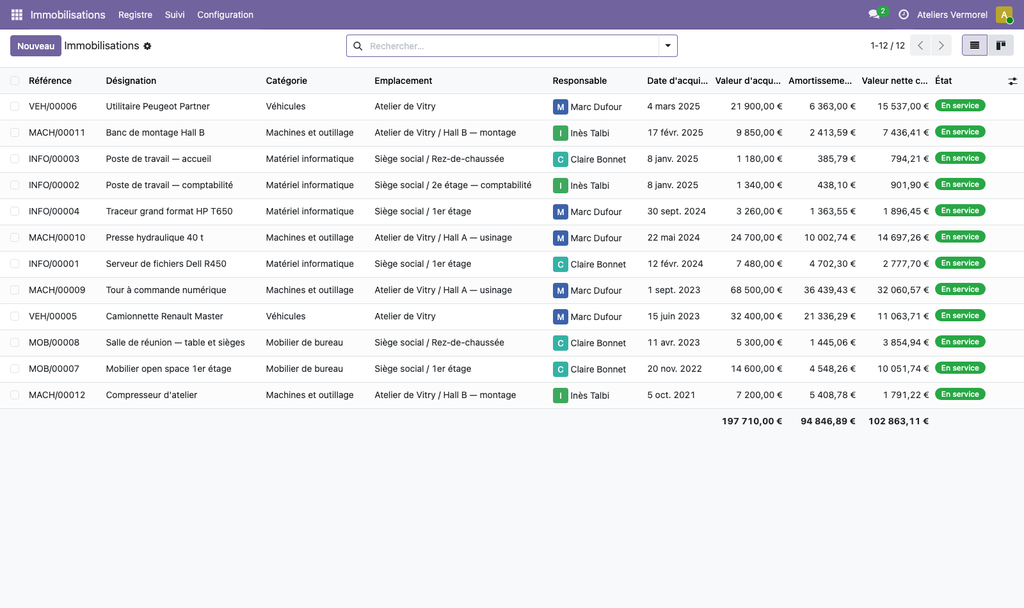
Fixed Asset Register for Odoo Community — account_asset is Enterprise only, so Community has no asset register at all. This one records every durable item: reference, category, serial and barcode, supplier and source document, acquisition and in-service dates, gross value, custodian, and a tree of sites, buildings and rooms. Physical stock-take campaigns compare the register with what is actually there and report missing, moved and present items. A tamper-proof movement log follows each item from purchase to disposal. Free, LGPL-3, no accounting dependency.
Overview
Fixed Assets — the register Community lacks
account_asset does not exist in the Community modules. You can check it with one command: of the 630 modules shipped with Odoo 19 Community, none has that name. l10n_es even goes as far as writing if 'account.asset' not in self.env before trying to populate it. Every Community company that owns durable equipment therefore keeps its fixed-asset register in a spreadsheet, or does not keep one.
This module keeps the register. It does not compute depreciation — the Fixed Assets — depreciation, schedules and entries module does that — and it says so on screen rather than silently displaying a wrong net book value.
Also searched as: fixed asset management Odoo Community, fixed asset register Odoo, physical fixed asset inventory, equipment tracking Odoo, account_asset Community, asset register Odoo 19.
The register
One record per asset: reference assigned automatically and prefixed with its category code, description, serial number, barcode of the label stuck on the asset, vendor, source document, acquisition date, in-service date, acquisition value, residual value. A batch of ten identical chairs can be held in one record; an asset tracked individually is held individually.
Locations are a hierarchy — site, building, floor, office — and not stock.location records. The two have neither the same granularity nor the same owner: the warehouse worker stores pallets, the accountant looks for a photocopier.
The reconciliation
This is what separates a register from a spreadsheet. You choose a scope — a building and its floors, a category — the module prepares the list of expected assets, and you tick them off: present, moved, missing. At closing, the moves found are carried over to the asset records and everything is written to the log.
The campaign refuses to close while lines remain unverified, and the refusal states how many remain and which ones. A half-finished inventory reconciliation that is closed anyway looks complete: that is precisely what makes it misleading.
The log cannot be rewritten
Registration, commissioning, transfer, physical inventory check, disposal: every movement leaves a dated, signed line. A record rule denies modification and deletion to everyone, including the asset manager. A log that can be corrected after the fact proves nothing to an auditor.
Leaving the fleet
Sale, scrapping, loss, theft, donation: the wizard asks for the date, the reason and the disposal proceeds together, because when entered one at a time one of the three is always missing. The base records the disposal; it computes neither gain nor loss, since it does not know the depreciation, and it says so in the wizard.
What the module does not do
No depreciation, no schedule, no accounting entries, no assets under construction, no revaluation. It creates no account, no journal and no chart of accounts: account already provides all of that, and the base does not even depend on it. These features are grouped in the dyo_immobilisations module, which plugs into four hooks documented in the code.
Specifications
| Price | Free |
|---|---|
| License | LGPL-3 |
| Odoo series | 19.0: published on the Odoo Apps Store; 20.0: published on the Odoo Apps Store |
| Version | 1.0.0 |
| Edition | Odoo Community / on-premise |
| Technical name | dyo_immobilisations_lite |
| Domain | Accounting and finance |
| Premium version | dyo_immobilisations |
Price excluding VAT as displayed on the Odoo Apps Store; purchase and installation are done on the Store or through your Omnifloo instance.